Export API
Your numbers, in your own warehouse.
curl https://mta.growthdept.ai/api/v1/exports/data-export \
  -H "Authorization: $MTA_API_KEY" \
  -H "Data-Client-ID: $MTA_BRAND_ID" \
  -H "Content-Type: application/json" \
  -d '{
    "level": "campaign",
    "time_granularity": "DAILY",
    "period_type": "LAST_7_DAYS",
    "attribution_options": {
      "attribution_models": ["linear"],
      "attribution_windows": ["7"],
      "accounting_modes": ["accrual"]
    },
    "metrics": [{ "id": "spend" }, { "id": "revAttributed" }, { "id": "roas" }]
  }'

{"id": "a71b..."}
Your data team gets exactly what the dashboard shows, as CSV files: any level, any dates, any model and any metric. Orders, spend and matched views from systems MTA doesn't connect to can come in the same way.
 Shopify
 Meta
 Google Ads
 TikTok
 YouTube
 Instagram
 Snapchat
 Pinterest
 Microsoft Advertising
 Amazon Ads
 AppLovin
 Reddit
 LinkedIn
 X
 The Trade Desk
 Vibe
 MNTN


 OpenAI Ads
 Klaviyo
Start, check, download
Big exports arrive as files you can check.
GET /api/v1/exports/data-export/result/a71b...

{
  "status": "SUCCESS",
  "rows": 24800,
  "files": [
    { "url": "https://.../0?expires=...", "rows": 4800,
      "start_date": "2026-08-01", "end_date": "2026-08-06" },
    ...
  ],
  "columns": ["date", "...", "spend", "attributed_revenue", "roas"]
}
Ask for an export, check its status, then download the CSV files from secure links. Long ranges are split into files of up to 25,000 lines, so no download times out.
The result says how many lines each file holds and which dates it covers, so a loader can tell a finished download from a dropped one.
Keys
A key for each job, with only the access it needs.
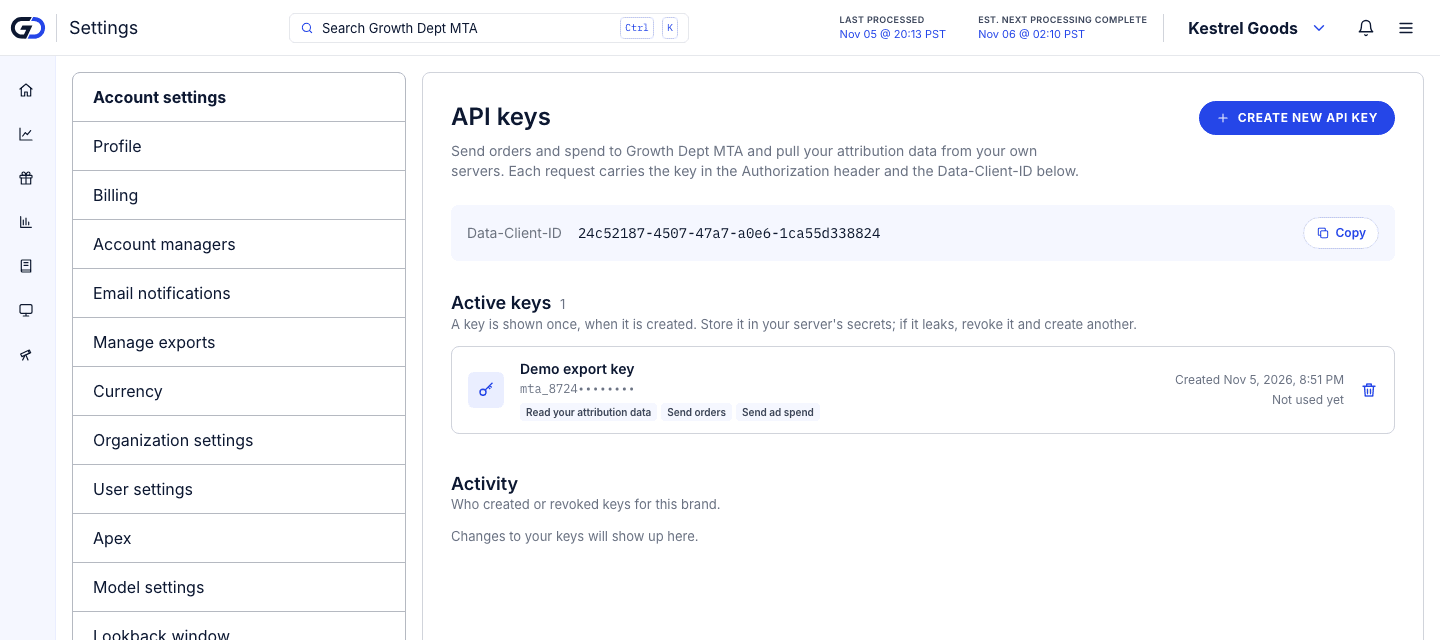
Owners and admins create keys in settings. Each key belongs to one store and gets only the access you tick: reading exports, sending orders, sending spend or sending matched views.
A key is shown once and can be revoked at any time. A warehouse reader needs nothing but export access.
Data in
Orders, spend and views from anywhere else.
POST /api/v1/views

{
  "views": [{
    "platform": "fb",
    "campaign_id": "120200000000100",
    "ad_id": "120200000000301",
    "viewed_at": "2026-11-02T14:03:11Z",
    "order_id": "6012345678901"
  }],
  "coverage": [{ "platform": "fb", "from": "2026-11-01", "to": "2026-11-02" }]
}
Send orders from a store that isn't on Shopify, daily spend from a platform without a connector, or ad views a partner has matched to your orders. They are credited like everything else.
Brands Growth Dept already runs can have a loader copy their MTA numbers into the warehouse Growth Dept runs for them.
Ask it
Answers to the questions you ask every week.
Each card opens the report that answers it.
Can we put these numbers next to the rest of our data?
Pull any report as CSV files into your own warehouse, on your schedule.
Export APIOpen itCan we track a number of our own, like revenue per visit from new customers?
Build it from the metrics you already have, name it, and add it to any table or chart.
Custom metricsOpen itWould this campaign still look good if we judged it differently?
See the same channels and dates under every attribution model, side by side.
Model comparisonOpen itWhich campaigns brought in new customers last week, and what did each one cost?
New-customer revenue, orders and cost per new customer for every platform, campaign, ad set and ad.
Sales attributionOpen itWhat is a customer we won in January worth by day 90?
Group customers by the month of their first order and follow what they spend, out to two years.
Customer LTVOpen it
Explore
More ways to find what sells
Numbers that add up.
Three rules every report keeps, checked by automated tests on every change.
1×
Each sale counted once
However many platforms claim an order, its revenue is split across the touches that led to it and never counted twice.
= Shopify
Totals match your store
Orders with no tracked ad get their own Unattributed row, so changing the model moves credit between rows and never changes the total.
1 currency
Spend and revenue in yours
Spend billed in another currency is converted once, at that day's European Central Bank rate, so ROAS never mixes two currencies.
Find out which ads really sell.
Book a 45-minute call with the Growth Dept team. We look at how you measure sales today and show you what MTA would add.